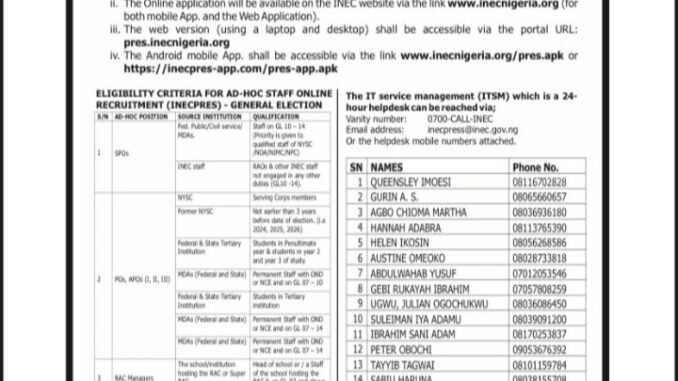
The Independent National Electoral Commission (INEC) has announced the activation of its INECPRES recruitment platform for Nigerians interested in serving as ad-hoc staff during the 2027 General Election.
According to the notice provided by INEC, the INECPRES portwl will open on Friday, September 18th, 2026, at 8:00am and close on Wednesday, November 18th, 2026, at 12 midnight.
Applicants are expected to complete their registration through the official INEC portal and meet the requirements for the particular ad-hoc position they wish to apply for.
One issue some applicants may encounter during registration is the failure to receive an OTP (One-Time Password) after creating an account. Other users may see messages such as “Invalid email or password” or “An account with this email address already exists.”
This guide explains what these messages mean and the steps applicants can take.
When Will INEC INECPRES Recruitment Open?
The INECPRES activation is scheduled to begin on September 18th, 2026, at 8:00am.
The application window is expected to remain open until November 18, 2026, at 12 midnight.
Where Can Applicants Apply for INEC Ad-hoc Staff Recruitment?
The notice states that the online application will be available through the INEC website and INECPRES platform.
The web application can be accessed through:
www.inecnigeria.org (for both mobile App. and the Web Application).
The web version (using a laptop and desktop) shall be accessible via the portal URL: pres.inecnigeria.org
The Android mobile App. shall be accessible via the link:
www.inecnigeria.org/pres.apk
or
https://inecpres-app.com/pres-app.apk
The notice also provides an Android application option through the INEC website.
Applicants should be careful when downloading applications or entering personal information. Before submitting sensitive information, confirm that you are using an official INEC channel.
INECPRES Ad-hoc Staff Positions
The recruitment covers different categories of ad-hoc personnel. Requirements vary depending on the position.
The categories listed in the notice include positions such as:
- Supervisory Presiding Officers (SPOs)
- Presiding Officers (POs)
- Assistant Presiding Officers (APOs)
- Registration Area Centre Managers
- Registration Area Technicians
- Other technology-related support roles
The eligibility requirements also differ according to the applicant’s institution, educational qualification, employment status and previous experience.
For example, some categories are targeted at eligible civil or public servants, students of tertiary institutions, NYSC members or former corps members, while certain technical positions require applicants with relevant ICT backgrounds.
Applicants should therefore check the requirements for their preferred position before completing the application.
Who Can Apply for INECPRES Ad-hoc Staff Recruitment?
The eligibility information in the notice covers several groups.
For some supervisory positions, qualified staff of government agencies and INEC may be considered, with particular attention to the stated grade-level requirements.
The notice also identifies eligible NYSC members and former corps members. Former corps members are required to fall within the specified period, with the notice referring to those who served from 2024, 2025 and 2026.
Students may also qualify for certain positions. The notice refers to students in their penultimate year and students in specified years of study at recognised tertiary institutions.
Some positions require applicants to have qualifications such as OND or NCE, depending on the role and employment category.
Because the requirements vary from one position to another, applicants should not assume that meeting the requirement for one position automatically makes them eligible for another.
INECPRES OTP Problems
Why Are Applicants Not Receiving OTP?
Some applicants may experience difficulties receiving the OTP required to activate their INECPRES account.
An OTP is a temporary verification code used to confirm an applicant’s email address or complete a registration process.
According to the information provided in the recruitment notice, applicants experiencing OTP-related problems should understand that technical issues with the portal may occur during the registration period.
If you have completed the first stage of registration but have not received your activation OTP, check the email address used during registration carefully.
Also check your:
- Inbox
- Spam or junk folder
- Promotions folder
- Updates folder
Give the system some time before repeatedly requesting a new code. Repeated attempts can sometimes create additional confusion if several verification messages are generated.
If the problem continues, applicants can contact the INEC IT service management helpdesk through the contact details provided by the Commission.
“Invalid Email or Password” Error on INECPRES
Another message applicants may see is:
“Invalid email or password. Please check your credentials and try again.”
This normally means that the email address or password entered does not match the credentials associated with the account.
However, applicants should also consider whether their profile has completed the activation process.
If you registered for the first time and have not activated your account using the OTP sent to your email, you may need to complete the activation process before accessing the account.
Check that:
- You are using the correct email address.
- Your password is entered correctly.
- Caps Lock is not affecting your password.
- You have completed the required account activation.
- You are accessing the correct INECPRES platform.
Avoid creating several accounts simply because you cannot immediately log into the first one.
“An Account With This Email Address Already Exists”
If the INECPRES portal displays:
“An account with this email address already exists. Please log in instead.”
it means the email address is already registered on the system.
This may happen to applicants who previously created an INECPRES account, including people who applied during an earlier election recruitment exercise.
If you previously registered, you should try to log into the existing account rather than creating another account with the same email address.
If you cannot remember your password, use the password recovery option.
How to Recover Your INECPRES Password
Applicants who have forgotten their INECPRES password can use the password recovery option provided on the portal.
The general process is:
- Open the INECPRES login page.
- Select the Password Recovery option.
- Enter the email address used during registration.
- Submit the request.
- Check your email for the password reset message.
- Follow the instructions provided to create a new password.
- Return to the login page and try again.
If the reset email does not appear immediately, check your spam or junk folder.
Make sure you enter the same email address used when the account was originally created.
What to Do If the INECPRES Portal is Not Working
Applicants should not immediately conclude that their application has failed simply because the portal is temporarily slow or unavailable.
Large numbers of people may attempt to access a recruitment portal when registration opens. This can result in slow loading, failed requests or delayed emails.
If you encounter a technical problem, you can try:
- Refreshing the page after some time.
- Using a stable internet connection.
- Clearing your browser cache.
- Trying another browser.
- Using a laptop or desktop for the web version where appropriate.
- Avoiding repeated submissions.
- Checking your email again later for an OTP or activation message.
- Contacting the official INEC helpdesk if the problem continues.
Applicants should also keep screenshots of genuine error messages where possible. This can make it easier to explain the problem when seeking technical support.
INEC Helpdesk Contact for INECPRES Issues
The notice provides an IT service management helpdesk for applicants experiencing technical problems.
The contact information includes the 0700-CALL-INEC vanity number and the INEC short code 4632.
The notice also provides the email address inecpress@inec.gov.ng and several helpdesk mobile numbers.
Applicants should rely on the contact information contained in official INEC announcements and avoid paying individuals who claim they can “activate” an account, provide an OTP or guarantee selection.
Is INEC Ad-hoc Staff Recruitment Free?
The notice clearly states that recruitment into the Nigerian electoral ad-hoc staff programme is free.
Applicants should therefore be cautious if anyone asks for money in exchange for registration, account activation, OTP delivery, recruitment or guaranteed selection.
Do not send your password, OTP or other sensitive account information to another person.
Important Tips for INECPRES Applicants
Before submitting your application, make sure your personal information is accurate.
Use an email address that you can access because important registration information may be sent there.
Keep your login details somewhere secure and do not share your password or OTP.
Applicants who already have an account should use the existing account rather than registering another account with the same email.
Most importantly, rely on official INEC information for changes to the recruitment timetable, eligibility requirements, application procedures and technical updates.
Frequently Asked Questions
When does INECPRES recruitment for the 2027 election start?
The notice states that INECPRES activation begins on September 18, 2026, at 8:00am.
When will INECPRES registration close?
The stated closing date is November 18, 2026, at 12 midnight.
Why have I not received my INECPRES OTP?
You may be experiencing a temporary technical or email-delivery problem. Check your inbox and spam folders and allow some time for the message to arrive. If the problem continues, contact the INEC helpdesk.
What does “account already exists” mean?
It means the email address has already been registered on the INECPRES system. If you previously applied, try logging into your existing account.
What should I do if I forget my INECPRES password?
Use the Password Recovery option on the login page and enter the email address associated with your account.
Is INEC ad-hoc staff recruitment free?
Yes. The recruitment notice states that the application is free.
Final Note for Applicants
The INECPRES registration period is expected to run for several weeks, so applicants should not panic if they experience temporary OTP or login problems when the platform becomes busy.
If you receive an error message, first identify what the message means before creating another account. An OTP problem, an incorrect password and an already-existing account require different solutions.
Applicants should also be careful with unofficial websites, social media posts and individuals requesting payment for INEC ad-hoc staff recruitment. Always confirm important updates through INEC’s official communication channels before taking action.

Working as the card reader