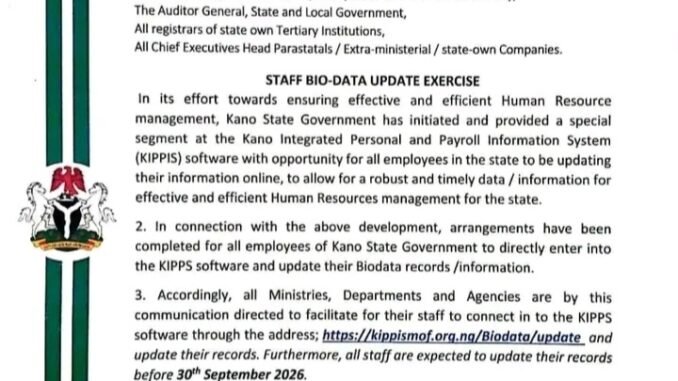
The Kano State Government has announced a staff biodata update exercise for employees across its Ministries, Departments and Agencies (MDAs). The exercise is being carried out through the Kano Integrated Personal and Payroll Information System (KIPPS).
According to the circular, the exercise is intended to help the state government maintain accurate and up-to-date employee records for effective human resource management.
All employees of the Kano State Government are expected to log into the KIPPS platform and review or update their biodata before the 30th September, 2026 deadline.
Kano State Government Staff Biodata Update 2026
The staff biodata update gives Kano State Government employees an opportunity to check their personal information on the KIPPS system and make necessary corrections or additions.
The government explained that having accurate employee information will provide better and more timely data for human resource planning and management.
All Ministries, Departments and Agencies have also been directed to facilitate the participation of their staff in the exercise.
KIPPS Biodata Update Portal
Employees can access the KIPPS biodata update platform through the official portal:
Existing users:
https://kippismof.org.ng/Biodata/Update
New users:
https://kippismof.org.ng/Account/Login
Staff members are advised to use the appropriate login option depending on whether they already have an account on the platform.
How to Update Your Biodata on KIPPS Portal
Kano State Government employees can follow these steps to complete the exercise:
Step 1: Access the KIPPS Portal
Open a web browser on your phone or computer and visit the KIPPS portal.
New users should use the account login page to create an account. Existing users can access the biodata update page directly.
For users who need to recover their login details, the guidance states that the KANOSG number should be used as the username, while the account number should be used as the password when applicable.
Step 2: Click on Biodata
After successfully logging into the dashboard, locate “Biodata” on the right-hand side of the dashboard.
Click on it and carefully review the information displayed in the template. Update the required sections with accurate and current information.
Employees should carefully check their entries before proceeding to the next step.
Step 3: Upload a Recent Passport Photograph
Staff are required to use a recent passport photograph where an update is necessary.
The stated maximum file size for the passport photograph is 100 KB.
If the passport photograph already on the system is current and does not need to be changed, staff are advised to leave that section blank.
Step 4: Save the Updated Information
After completing the biodata template, review the information entered to reduce the possibility of errors.
Once everything is correct, click the “Finish & Save” button to submit and save the updated information.
Deadline for Kano State Staff Biodata Update
The deadline for the Kano State Government staff biodata update exercise is 30th September, 2026.
Employees are advised not to wait until the final day before attempting to update their records. Those experiencing login or technical difficulties should seek assistance through the appropriate administrative channels within their MDA.
Information Staff Should Check
Before submitting the form, employees should carefully review their personal and employment information. This may include details displayed in their KIPPS biodata template.
It is important to enter accurate information and avoid submitting incorrect or incomplete records.
Why the Biodata Update Is Important
The exercise is part of the Kano State Government’s effort to maintain a reliable employee database.
Accurate staff information can assist government in areas such as human resource planning, payroll administration and general management of public-sector employees.
The government has therefore directed its Ministries, Departments and Agencies to give the exercise the necessary publicity and facilitate participation by their staff.
Conclusion
All Kano State Government employees are encouraged to complete the KIPPS biodata update before the 30th September, 2026 deadline. Staff should use the designated KIPPS portal and carefully review their information before clicking “Finish & Save.”
Employees should also rely on official government communication and their respective MDAs for clarification where they encounter problems with the process.
Frequently Asked Questions
When is the Kano State staff biodata update deadline?
The stated deadline is 30 September 2026.
Where can Kano State workers update their biodata?
Employees can use the KIPPS portal at kippismof.org.ng through the biodata update section.
What is the maximum passport photo size?
The guidance states that the passport photograph should have a maximum file size of 100 KB.
What should I do after updating my biodata?
Review your information carefully and click “Finish & Save” to complete the update.
Who is expected to participate?
The exercise covers employees of the Kano State Government across its Ministries, Departments and Agencies.

Be the first to comment